You bought 1,000 contacts. Then loaded them into your sequencer. Hit send. Meanwhile, bounces rolled in before lunch. Your sender reputation took a hit already, and the vendor? No refund, no replacement credits, nothing. So you paid for bad data once, then paid again to fix the damage.
This is why a contact data refund policy matters more than any database size claim. After all, B2B contact data decays at 22.5% per year, or roughly 2.1% every month. Plus, tech contacts churn at 25-35% a year, and startups at 30-40%. So if your vendor’s data is even three months old, you’re starting 6% behind before you hit send.
In this teardown, you’ll see how ZoomInfo, Apollo, Lusha, Cognism, UpLead, and ReachFast handle refunds. Who gives credits back, who hides behind fine print, and what a real buyer-safety clause should look like. Plus a buyer checklist you can use on any vendor call.
Quick Take (For the Busy Reader)
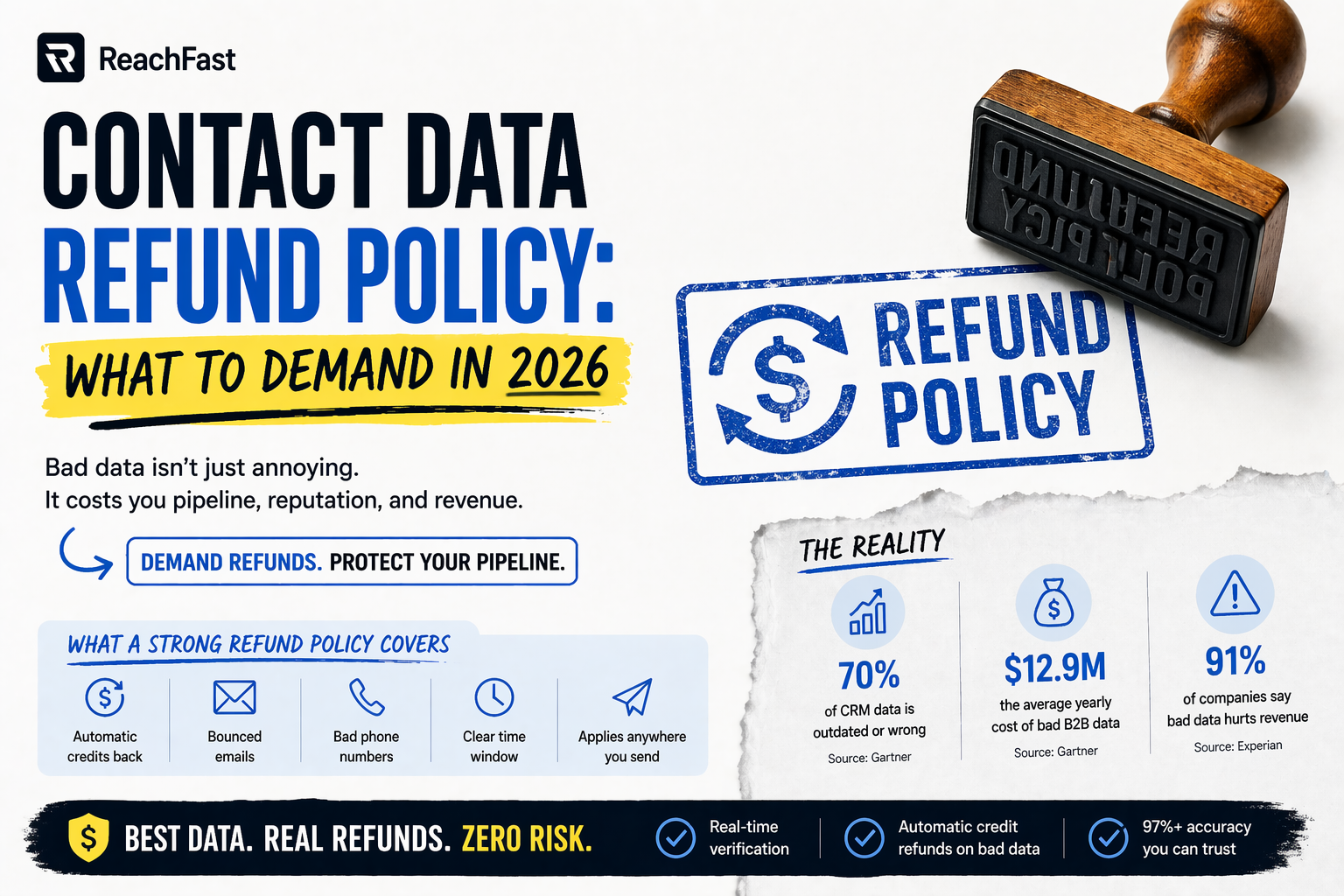
- 70% of CRM data is outdated or wrong, costing sales teams 500 hours a year in lost time.
- Top providers hit 97%+ accuracy, but the industry average sits closer to 50%.
- 91% of companies say bad data hurts their revenue, per Experian’s Global Data Management Report.
- Many vendor refund policies only apply to emails you send inside their own platform, not from your CRM or sequencer.
- Automatic credit refunds are rare. Most vendors still need manual claims with proof.
The real math on bad B2B data
First, the scale. Gartner puts the yearly cost of bad B2B data at $12.9 million per company. For smaller teams, the damage hits harder as a share of budget, because each wasted credit takes a bigger bite.
Plus, data decay never stops. Though a database may hit 95% accuracy this quarter, it drops closer to 88% by next quarter. Meanwhile, 23-30% of email addresses go bad each year, along with 18% of phone numbers.
So here’s where the refund policy hits your P&L. If a vendor charges a credit for every contact reveal, and 15% of reveals come back bad, you’re paying extra by 15% on every buy. Across 10,000 credits a year, that’s 1,500 wasted credits. In short, a real refund policy wins those back. A weak one writes them off.
What a meaningful contact data refund policy actually covers
Not all refund policies work the same way. Below are the points that split real buyer safety from marketing copy.
| Criteria | What it looks like in practice |
|---|---|
| Automatic vs. manual | Credits refund on their own, or you file a claim |
| Scope | Covers bounced emails, bad phones, job-change data |
| Time window | 7 days, 30 days, or no window at all |
| Where it applies | Only in-platform, or anywhere you send the email |
| Cap on volume | Some vendors cap refunds at 10% of credits used |
| Proof required | Screenshot, server logs, written notice |
Key takeaway: The best refund policies work on their own, cover both email and phone, and don’t make you chase support for your own money.
Vendor teardown: how the major B2B contact databases handle refunds
Here’s each vendor’s approach based on public terms and support docs as of 2026.
| Vendor | Refund policy | Automatic? | Notes |
|---|---|---|---|
| ZoomInfo | Prorated subscription refund if over 5% bad data lasts 30+ days after written notice | No | Formal notice required; sole remedy |
| Apollo | Credit refund on bounced emails you send within Apollo, within 30 days | Yes (in-platform only) | No refunds on mobile numbers; unused credits expire |
| Lusha | No replacement credits or refunds based on data quality | No | Credit use is final |
| Cognism | Flat pricing without strict credit ceilings; terms set per contract | Varies | Enterprise-style deals |
| UpLead | 95% accuracy promise; credit refunds on flagged bad emails | Yes | Stated on their site |
| ReachFast | Automatic credit refund on bad data; checks every email in real time at export | Yes | No claim or proof needed |
Key takeaway: Apollo and UpLead refund under set conditions. Lusha doesn’t refund based on accuracy. ZoomInfo’s prorated subscription refunds require formal notice. Meanwhile, ReachFast refunds trigger on their own when data fails checks.
Why do most “money-back guarantees” fall apart in the fine print?
A few patterns show up again and again. Once you spot them, you can protect yourself before signing.
Scope limitation
First, Apollo refunds credits only for emails you send inside Apollo. So if you send a message to an Apollo verified email within 30 days of requesting it and the email bounces, Apollo refunds your credits in the next billing cycle. However, Apollo only refunds credits for emails you send from inside Apollo. Then export the contact to Outreach or Salesloft and bounce there? No refund.
Credit expiration
Next, Apollo credits expire at the end of your billing cycle, whether monthly or yearly. Plus, you lose unused credits at cycle end with no refund and no extension. So even untouched credits vanish.
Mobile exclusions
Also, Apollo excludes mobile numbers from refunds. Burn 500 mobile credits on dead dials, and that cost is yours to eat.
Notice periods
Meanwhile, ZoomInfo’s license has a notice rule. Per their terms, the licensee’s sole remedy is written termination plus a prorated refund of fees. So that’s a legal process, not a quick credit back.
Flat denials
Finally, Lusha’s terms say it plainly: once you use a credit, you can’t get it back. In other words, Lusha won’t swap credits or refund based on data quality. Buyer beware.
Automatic refund vs. manual refund: which is the real protection?
Here’s the practical gap. Say you’re an SDR running a 500-contact campaign, and 40 emails bounce.
With a manual refund policy, you have to:
- Pull the bounce report
- Match bounced emails to credit charges
- File a claim with support
- Wait for review
- Hope the vendor agrees
In practice, most SDRs never bother for 40 credits. Honestly, it’s not worth the hour. So the refund exists on paper but never happens in real life.
Meanwhile, automatic refunds trigger on the vendor’s side. No claim, no proof, no support ticket. Bad data, credit back, done. For RevOps teams tracking cost per lead and agency owners billing clients per campaign, that gap buys real budget safety, not just a PR line.
How ReachFast’s refund model works
ReachFast checks every email and phone number in real time at the moment of export.
How the check works
First, if a record fails the check, you don’t get charged. Second, if you spend a credit on data that later goes bad, the credit refunds on its own. Plus, with a 7+ source data waterfall, if one source misses, another fills in. As a result, you get 97%+ email accuracy and 92%+ direct dial accuracy at export, not on a marketing slide.
Who it’s built for
Though any outbound team gains, a few roles gain the most:
- SDRs and BDRs who can’t afford bounce rates killing sender reputation mid-quota.
- AEs who need direct dials that ring, not dead numbers.
- RevOps teams building cost-per-lead dashboards that finance will sign off on.
- Agency owners running outbound for many clients with no time to hand-claim refunds.
- Recruiters chasing passive candidates where one wrong number closes the window.
- Founders bootstrapping outbound where every dollar comes out of runway.
Pricing and compliance
Besides the refund model, pricing starts at $39.99 a month for 1,000 credits and 100 phone numbers, month-to-month, with no yearly lock-in. Also, new accounts get 5 free verified contacts on signup to test data on your own ICP before you spend a dollar. Finally, ReachFast meets GDPR, CCPA, and DSGVO rules for teams selling into EU markets.
Buyer checklist before you sign anything
Before dropping $5K to $50K on a B2B contact database, walk through these eight questions:
- Is the refund policy automatic or manual?
- Does it cover both emails and phone numbers?
- Does it apply only in-platform, or anywhere you use the contact?
- Do unused credits roll over, or expire?
- What’s the notice period to cancel?
- Is there a cap on how many credits can get refunded?
- Can you end the contract mid-term if data quality drops below a stated threshold?
- Does the refund tie to real-time checks, or does it need you to prove the bounce?
Key takeaway: If a vendor can’t answer all eight clearly, walk away or push back. That’s your first red flag.
Frequently asked questions
Which B2B contact databases actually refund credits for bad data?
Apollo refunds credits when you send emails inside its platform and they bounce within 30 days. Also, UpLead refunds credits when its verifier flags an email as bad at reveal. Meanwhile, ZoomInfo gives prorated subscription refunds if accuracy falls below 95% after written notice. On the other hand, ReachFast refunds credits on its own at export when data fails checks. Lusha, per its public terms, does not refund based on accuracy.
What’s the difference between a credit refund and a subscription refund?
Credit refunds return the specific credits you used on bad contacts, usually within days. Meanwhile, subscription refunds return part of the fee you paid for the full contract term, usually after a formal dispute. So ZoomInfo’s policy uses subscription-level refunds with notice periods. In contrast, Apollo and ReachFast focus on per-contact credit refunds.
Do refund policies apply to phone numbers too?
Often no. For instance, Apollo excludes mobile numbers from refunds. Besides that, Lusha’s policy doesn’t refund based on accuracy at all. However, ReachFast’s automatic refund covers both verified emails and direct dials.
How do I prove a vendor’s data is bad enough to claim a refund?
Track bounce rate and phone connect rate. For instance, a hard bounce rate above 2-3% on a list the vendor called verified points to stale data. Also, a connect rate below 5-10% on direct dials is low even by outbound norms. So keep your sending logs and dialer reports in case you need proof for a manual claim.
Why do credits expire at the end of the billing cycle?
Most vendors use expiring credits to protect recurring revenue. In practice, if you miss your quota in a given month, you lose the unused credits. On the flip side, month-to-month providers without expiring credits give more room, which matters for seasonal teams and agency owners juggling client launches.
Is a refund policy the same as an accuracy guarantee?
No. An accuracy guarantee makes a marketing claim (for example, “95%+ accurate”). However, a refund policy fixes the problem when accuracy falls short. In fact, many vendors publish accuracy claims without matching refund terms. So the two need to line up in writing.
Are there GDPR implications when a vendor refunds bad contact data?
Yes, in a side way. For instance, when the tool flags a record as bad and refunds it, the vendor should also update or remove that record from circulation. As a result, GDPR, CCPA, and DSGVO certified vendors tend to handle this cleanly. On the other hand, non-certified vendors may recycle the same bad data to the next buyer.
What’s the best refund policy for a small agency or solo founder?
Automatic credit refunds, month-to-month billing, no seat minimums, and no claims process. In short, this keeps budget flexible and cuts the admin cost of chasing every bad record. So ReachFast’s month-to-month plans starting at $39.99 plus 5 free signup credits fit this profile for agency owners, recruiters, and founders running outbound solo.
Stop paying for bounces
Every bounced email chips away at your sender reputation. Plus, every dead phone burns SDR time. However, most contact data refund policies make you work for your money back instead of protecting your budget up front.
ReachFast flips that model. It checks every email and direct dial in real time at export from a 7+ source waterfall. So if a contact comes back bad, the credit refunds on its own. No claim, no proof, no support ticket.
Start with 5 free verified contacts on signup. Then month-to-month plans begin at $39.99 for 1,000 credits and 100 direct dials. Test the data on your own ICP before you commit a dollar.
Sources
Salesmotion: Apollo.io Pricing Breakdown 2026
Apollo Knowledge Base: How Do Data Requests Work
ZoomInfo License Terms and Conditions
Saleshandy: Lusha vs Apollo 2026
Landbase: 39 B2B Database Statistics 2026
Cleanlist: How Much Does Bad Data Cost