Most first-time outbound builders lose their first 90 days to the wrong problems.
For example, they buy a data tool before they’ve written a message. Or, they launch a sequence before they know their ICP. Then, they blame the channel when the meetings don’t show up. Three months later, the pipeline looks flat, the spreadsheet is a mess, and nobody can say why.
Still, none of that is a given. When you build outbound sales pipeline the right way, you can go from zero to 20 booked meetings a month in under 90 days, using a lean stack and a repeatable motion. So this is the seven-phase playbook top teams use, broken down by phase, with the common mistakes at each step.
The 7 Phases of an Outbound Pipeline
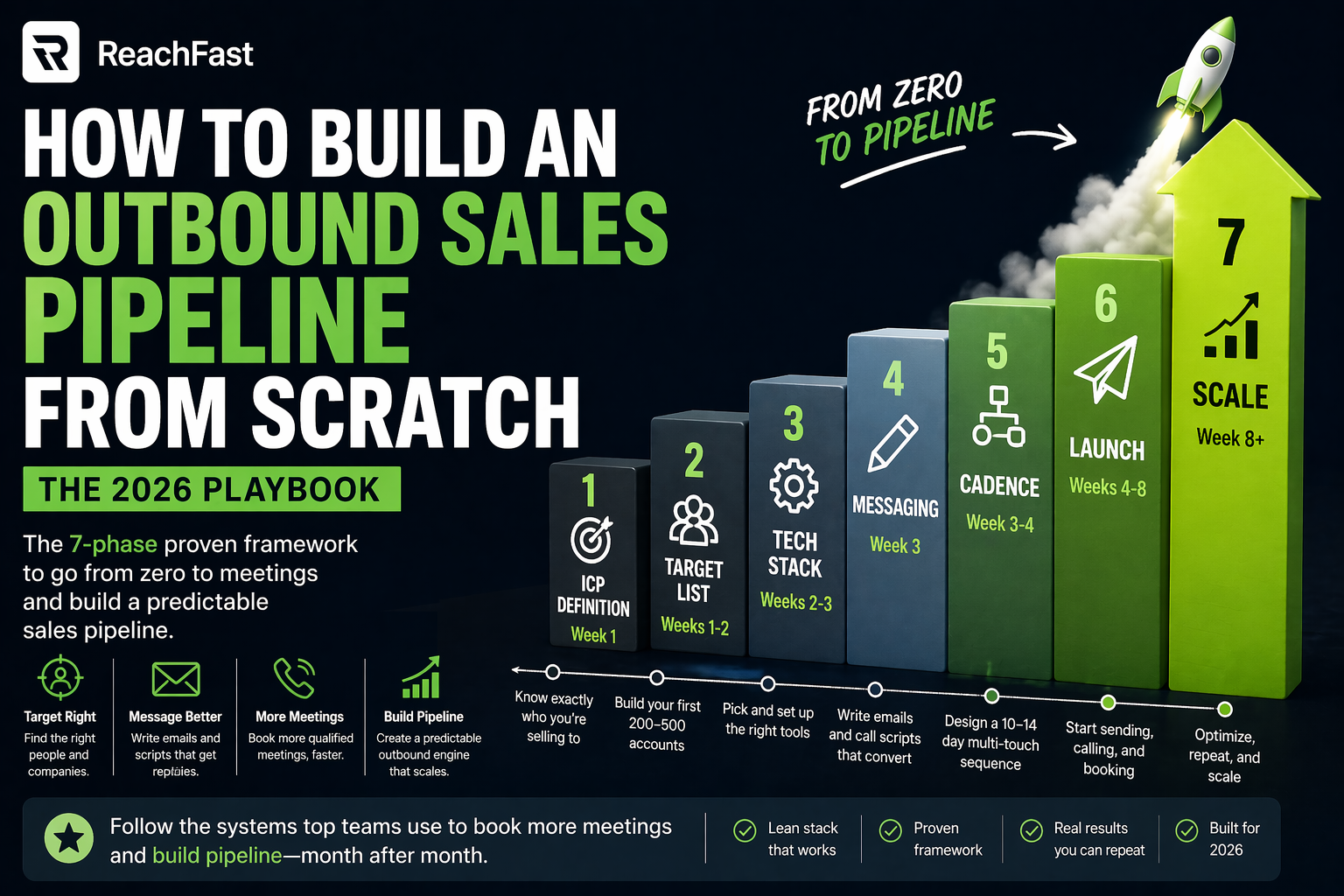
First, here’s the whole process at a glance before we dig into each phase:
| Phase | Goal | Time | Key Output |
|---|---|---|---|
| 1. ICP Definition | Know exactly who you’re selling to | Week 1 | 1-page ICP doc |
| 2. Target List | Build your first 200-500 accounts | Weeks 1-2 | CSV with real contacts |
| 3. Tech Stack | Pick and set up your tools | Weeks 2-3 | Working CRM, sequencer, data tool |
| 4. Messaging | Write your scripts and emails | Week 3 | Email templates, call scripts |
| 5. Cadence | Design your 10-14 day sequence | Week 3-4 | Multi-touch workflow |
| 6. Launch | Start sending and dialing | Weeks 4-8 | 2-5% reply rate, first meetings |
| 7. Scale | Tune, repeat, expand | Week 8+ | Steady pipeline |
Each phase builds on the last. However, skip one and the next one breaks.
Phase 1: Define Your Ideal Customer Profile
Everything downstream rides on this step. So a sharp ICP means every email, call, and dollar gets spent on prospects who can actually buy.
Set your ICP on a single page. Also, keep it to five fields:
- Industry: Narrow enough that you could name 20 companies who fit.
- Company size: Employee range or revenue range.
- Location: Country or region.
- Titles: The roles you’re selling into (not just the C-suite).
- Trigger events: What’s happening at the company that makes them ready to buy. Think funding, hiring, leadership changes, or product launches.
Here’s a good ICP example: “VPs of Sales at Series B SaaS companies in North America, 50-500 employees, hiring 5 or more sales reps in the last 90 days.”
In contrast, a weak ICP example looks like: “Mid-market SaaS companies.”
The first one narrows the list to about 300 accounts you can actually work. Meanwhile, the second gives you 50,000 accounts you’ll never touch.
Common mistake: going too broad. If your ICP can’t fit on one page with tight filters, it’s not sharp enough to build against.
Phase 2: Build Your Target Account List
Once your ICP is locked, build a list of 200 to 500 accounts that fit.
Here are the sources worth pulling from:
- LinkedIn Sales Navigator for industry and title filters
- Crunchbase or PitchBook for funded startups
- G2 and Capterra for companies using a specific tool
- News alerts (Google Alerts, Ocoya) for trigger events
For each account, map 2 to 3 contacts by name and title. Then enrich with contact data. This is where most first-time pipelines stall, because the data part is where things get messy fast.
Different tools fit different volumes. For instance, a Chrome tool like Lusha handles small lists well through one-off lookups. Meanwhile, a platform that checks data at export, like Reachfast, fits mid-volume motions. Paste a LinkedIn URL, get a real mobile number, and pay only for valid data. On the other hand, enterprise databases like ZoomInfo suit large teams with annual procurement cycles.
Benchmark: an early-stage pipeline should aim for 50 to 200 new leads per week. However, enterprise motions with $100K-plus deal sizes may only need 10 to 20 high-quality leads per week.
Phase 3: Build Your Tech Stack
Three tools. That’s all you need to start.
1. CRM. HubSpot’s free tier is a clean place to start. Pipedrive works too. Also, Salesforce makes more sense once you have multiple products and deal stages.
2. Sequencer. Instantly, Smartlead, or Apollo handle most early-stage needs. Pick one with built-in warmup and inbox placement tools.
3. Data tool. This is the one most motions underthink. A database with stale contacts will hurt your sender score in the first week. Instead, pick a tool that checks data at export and refunds bad records automatically.
That’s it. No conversation intelligence, no AI add-ons, no parallel dialer. Add those later once you’ve got a motion that works.
Common mistake: layering on every tool at once. For instance, a big tech stack with an untuned motion produces the same results as a small stack with an untuned motion, just at higher cost.
Phase 4: Write Your Messaging
Messaging is two things: cold emails and cold call scripts. Neither should be long.
Cold email structure
A first-touch email should land under 80 words. It breaks into four parts:
- Trigger or reference. One line that shows you did real research.
- Pain hook. One line about a problem their peers are dealing with.
- Value statement. One line about an outcome, not a feature.
- Ask. One line, one question.
For example:
“Hey Alex, saw your team just posted 5 sales roles. Most new sales teams hit a wall at week 3 because the data they’re dialing is stale. We fixed that for the team at [peer company] and they went from 2 to 8 meetings a week. Worth 15 minutes next Tuesday?”
That’s 58 words. The prospect can read it in 7 seconds and reply in another 5. In contrast, long emails die in the preview pane.
Cold call structure
A cold call opener should land in under 15 seconds. It breaks into three beats:
- Introduction. “Hey Alex, this is [your name] from [company].”
- Permission. “Do you have 27 seconds?”
- Hook. Same pain-and-peer structure as the email.
Full scripts by scenario are worth building out. For instance, permission-based openers, gatekeeper bypass lines, voicemail scripts, and objection responses all need their own version.
Common mistake: writing 300-word emails that pitch the whole product. Remember, a cold email sells the reply, not the demo.
Phase 5: Build Your Cadence
A cadence is the sequence of touches you run against each contact. In short, single-touch campaigns don’t work anymore.
In fact, 80 percent of deals need 5 or more touches before a prospect engages. Meanwhile, most outbound motions give up after 3 MarketBetter Blog.
Here’s a solid starting cadence for a 12-day window:
| Day | Channel | Touch |
|---|---|---|
| 1 | First-touch email with trigger reference | |
| 2 | View profile, no message | |
| 4 | Call | First call, leave voicemail if no answer |
| 4 | 10 minutes after call, reference voicemail | |
| 6 | Connection request with short note | |
| 8 | Call | Second call, different time of day |
| 10 | Different angle, share a case study | |
| 12 | Breakup email, “Should I close the file?” |
Eight touches across three channels. Spread them over 12 business days so you’re not spamming.
Common mistake: running email-only cadences. As a result, you miss out on multi-channel outbound, which converts roughly 3x better.
Phase 6: Launch and Measure
Don’t launch with 500 contacts. Start with 50.
Run the first week as a pilot. Same cadence, same messaging, small volume. Watch for these signs:
- Bounce rate. Should be under 2 percent. Higher means your data or sending setup is broken.
- Reply rate. Aim for 2 to 5 percent positive replies on the first campaign.
- Connect rate on calls. Should be 18 to 22 percent on real mobile data.
- Deliverability. Use GlockApps or MailTester to confirm you’re landing in the primary inbox.
If any of these are off, fix them before you scale volume. Otherwise, scaling a broken motion just makes the problem bigger.
First-quarter pipeline benchmarks
Here’s what “good” looks like in months 1-3:
| Metric | Month 1 | Month 2 | Month 3 |
|---|---|---|---|
| Contacts touched | 200 | 500 | 1,000 |
| Positive reply rate | 2-3% | 3-4% | 4-5% |
| Meetings booked | 5-8 | 12-18 | 20-30 |
| Show rate | 60-70% | 70-80% | 80%+ |
| SQL rate (meeting → opp) | 20-30% | 30-40% | 40-50% |
If you’re in the range, you’re building the right thing. However, if you’re below, diagnose before you add volume.
Phase 7: Scale What Works
By month 3, you have enough data to make scaling calls.
Here’s how to tell which lever to pull:
Double down on the best segment. If one ICP slice is out-converting the others by 2x or more, shift 60% of your volume there. In fact, most motions have one unfair segment hiding in the data that only shows up after 200-300 contacts.
Tighten the cadence. Look at which touch is producing most of your replies. If day 4 calls are your winner, move them to day 2. However, if day 10 case-study emails are driving meetings, make them touch 3 instead of touch 7.
Expand channels. Add SMS, video messages, or direct mail for high-value accounts. As a result, you often pull a 2-3% reply rate up to 7-10% on top-priority segments.
Rebuild the list. If your reply rate is stuck under 2%, the issue is almost never the copy. Instead, it’s the ICP or the data. Rebuild the list with a tighter filter and re-verify every contact.
Common mistake: adding volume before tuning. Scaling broken messaging to 5,000 contacts gives you 5,000 non-replies and a hurt domain score.
Key Metrics to Track From Day One
Six numbers matter. Everything else is vanity.
- Contacts touched per week (effort metric)
- Positive reply rate (message quality)
- Connect rate on calls (data quality)
- Meetings booked per week (outcome)
- Show rate (meeting quality)
- SQL rate (fit)
Track these weekly. Still, if any dip, diagnose the upstream cause before changing anything downstream.
The Cost of Getting It Wrong
Building outbound takes investment, but rework takes more.
For instance, a badly run first campaign can put your main sending domain on a blocklist, taking out every email your team sends for weeks. Meanwhile, a list built without tight filters burns through your best accounts on a weak message, so you can’t re-approach them for months. On top of that, fixing a hurt sender score takes 2 to 4 weeks of clean, low-volume sending before it recovers.
Fixing these after the fact takes weeks or months. In contrast, building the playbook first takes weeks. So the math always favors building right the first time.
The Pipeline Health Checklist
Run this every Friday to catch drift early:
| Check | Threshold | What to Do If It Fails |
|---|---|---|
| Bounce rate under 2% | Weekly | Re-verify list, check SPF/DKIM/DMARC |
| Reply rate 2-5% | Weekly | Rewrite opener, tighten ICP |
| Call connect rate 18-22% | Weekly | Switch to real mobile data |
| Show rate 70%+ | Weekly | Tighten meeting confirmation flow |
| Pipeline coverage 3x quota | Monthly | Add volume or expand ICP |
| Domain reputation | Monthly | Check Google Postmaster Tools |
Key takeaway: 20 minutes a week of this checklist prevents most of the issues that kill early pipelines.
Compliance Basics You Can’t Skip
Outbound laws tightened in 2025 and keep tightening. For instance, US TCPA cases surged 95 percent, with new state-level rules in Texas, Virginia, and Connecticut adding fines up to $20,000 per call. Meanwhile, EU and UK contacts need a lawful basis under GDPR. Germany adds DSGVO. Also, California adds CCPA. So always use data sources that document lawful collection, honor opt-outs the same day, and stay inside local calling hours (generally 8 AM to 9 PM local time in the US). After all, non-compliance is a line item most builders underestimate until a demand letter shows up.
Frequently Asked Questions
How long does it take to build an outbound sales pipeline from scratch?
First-touch meetings usually start in week 3 or 4. Consistent pipeline (10 or more meetings per month) typically shows up in month 3. In general, most motions see steady pipeline by month 4 or 5, once the cadence, messaging, and data stack have been through 2 or 3 rounds of tweaks. However, if you’re at month 6 with no pipeline, the problem is almost always ICP sharpness, not effort.
What tools do I actually need to build an outbound sales pipeline?
Three core tools cover the first 90 days: a CRM for tracking contacts and activity, a sequencer for multi-step email and LinkedIn outreach, and a data tool for verified contact information. Many motions also add a domain warmup service if they’re using new sending inboxes. For instance, most teams skip conversation intelligence and AI add-ons until they’ve proven the basic motion works.
What reply rate should I expect from a cold email campaign?
A new campaign with clean data and sharp messaging should hit 2 to 5 percent positive replies. However, tuned campaigns with strong ICP targeting can hit 7 to 10 percent. On the flip side, anything below 1 percent signals a list or message problem. In fact, most first-time motions get 1 to 2 percent and panic, then rewrite their copy when the real issue is their data.
How many meetings per month is realistic in the first quarter?
Month 1: 5 to 8 meetings from a pilot of 200 contacts. Month 2: 12 to 18 meetings from 500 contacts. Month 3: 20 to 30 meetings from 1,000 contacts with a tuned cadence. These numbers assume one focused operator running the motion full-time. Meanwhile, doubling the volume tends to double the outputs, but expect the ramp to take another 2 to 3 months.
How do I keep my outbound sales pipeline healthy long-term?
Treat it like a living system, not a one-time build. For one, run a weekly health check on bounce rate, reply rate, and connect rate. Re-verify your list monthly because B2B data goes stale fast. Also, rotate sending domains if you scale past 100 emails a day per inbox. Finally, rebuild your ICP every quarter based on who’s actually converting, not who you thought would.
Do I need a CRM on day one?
Yes, but not an expensive one. For one, HubSpot’s free tier handles the first 90 days for any small motion. Pipedrive works too. The goal of the CRM is to track contacts, log activity, and see what’s working. So you don’t need Salesforce until you have multiple products, complex deal stages, or a real reporting need. Otherwise, over-engineering your CRM on day one just slows you down.
What’s the fastest way to fix a stalled pipeline?
Start with data quality. If bounce rates are above 3% or connect rates are below 10%, the issue is almost always your contact source. Re-verify every address and number with a real-time tool before changing copy. In fact, most stalled pipelines get fixed by rebuilding the list, not rewriting the emails. Swap to a data source that verifies at export and refunds bad records, then run the same cadence again.
How do I know when to scale my outbound pipeline?
Three signals say you’re ready: you’ve hit the reply rate benchmark for your month (2-5% by month 1, 4-5% by month 3), your show rate is above 70%, and your pipeline-to-close math actually works (3x coverage of your revenue target). Meanwhile, if any of those are missing, scaling just multiplies the gaps. So tune first, scale second.
Sources
- Outbound + Cold Email + SDR-Led Demand Generation 2026 — Fypion Marketing
- Master the Sales Development Playbook — Highspot
- B2B Outbound Sales Strategy Guide for 2026 — MarketBetter
- Outbound Sales Complete Playbook — Outbound Sales Pro
- Sales Development Playbook: Complete SDR Workflows — Outbound Sales Pro
- How to Build a Sales Pipeline from Scratch 2026 — Auto Interview AI
- How to Build Inbound and Outbound Sales Teams 2026 — AiSDR
- AI Calling for Startups — Auto Interview AI