LinkedIn is where most B2B prospecting starts, but it’s rarely where you can find phone numbers on LinkedIn profiles themselves. With over 1.3 billion members worldwide and tens of millions of decision-makers active on the platform, it’s usually the fastest way to confirm someone’s current job title, company, and seniority before you reach out.
What it isn’t good for is giving you a phone number. Most people never add one to their profile, and even when they do, LinkedIn only shows it to first-degree connections. So sales reps, recruiters, and agency owners end up doing the same thing: finding the right person on LinkedIn, then switching to a separate tool to find a way to actually call them.
That second step is what this guide is about. If you need to find phone numbers on LinkedIn regularly, whether for outbound sales, recruiting, or partnerships, a dedicated tool is usually the difference between a five-minute lookup and a five-second one. We looked at nine tools built specifically for pulling phone numbers (and usually emails) out of LinkedIn profiles, compared their pricing, coverage claims, and how they fit into a prospecting workflow, and put together a comparison you can actually use to shortlist a couple of options.
Key Takeaways
- LinkedIn profiles rarely display a phone number publicly, so most teams pair LinkedIn search with a separate contact-enrichment tool.
- Nearly every serious option in this category runs on a credit-based model with a free tier for testing before you commit.
- Direct mobile and work-direct numbers matter more than raw contact counts. A tool that returns a switchboard number isn’t much use if you’re trying to reach one specific decision-maker.
- Coverage varies a lot by tool, region, and how the provider sources its data, so testing two or three options on your own list is worth the hour it takes.
- None of the tools below give you permission to scrape LinkedIn or automate your account. Read the compliance section before you build a workflow around one.
How We Compared These Tools to Find Phone Numbers on LinkedIn
We looked at nine tools that are built or heavily used for turning a LinkedIn profile into a working phone number: Reachfast, ContactOut, Kaspr, SignalHire, SalesQL, Lusha, Surfe, Apollo, and RocketReach. For each one, we checked its current public pricing page, its stated data coverage, whether it prioritizes direct/mobile numbers over generic company lines, and whether it works as a Chrome extension on LinkedIn itself or requires exporting profiles elsewhere.
Pricing and feature details change often in this category, so treat the figures below as a snapshot and confirm current numbers on each vendor’s own pricing page before you buy.
Quick Comparison Table
| Tool | Best For | Works Inside LinkedIn | Starting Price | Free Option |
|---|---|---|---|---|
| Reachfast | Direct mobile numbers from a LinkedIn URL | Yes (extension + web app) | From $99.99/mo | 5 free contacts |
| ContactOut | High-volume email + phone lookups | Yes (extension) | From $49/user/mo | Yes |
| Kaspr | SDR teams prospecting inside LinkedIn | Yes (extension) | From $59/user/mo | Yes |
| SignalHire | Recruiters needing personal + work contacts | Yes (extension) | From $69/mo | Yes |
| SalesQL | Budget-friendly LinkedIn enrichment | Yes (extension) | From $39/mo | Yes (50 credits/mo) |
| Lusha | Outbound teams wanting intent data too | Yes (extension) | From $49.90/mo | Yes |
| Surfe | Syncing LinkedIn profiles straight to a CRM | Yes (extension) | From $39/user/mo | Yes |
| Apollo | Teams that want data + a built-in dialer/sequencer | Partial (extension + database) | From $49/mo | Yes |
| RocketReach | Broader people/company search beyond LinkedIn | Partial (browser workflow) | From $49/user/mo | Yes |
The 9 Tools, Reviewed
1. Reachfast
Reachfast is built specifically around the workflow of pasting in a LinkedIn URL and getting back a verified phone number and email. Instead of pulling from a single database, it runs each profile through a waterfall of 7+ data providers, which is the main reason its coverage tends to hold up on profiles that other single-source tools miss.
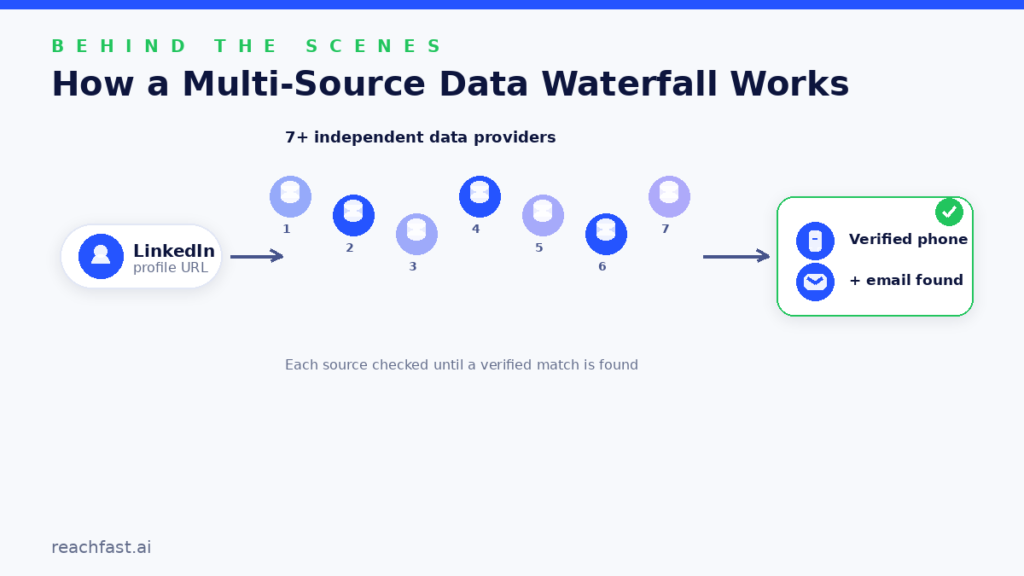
A few things stand out. Reachfast prioritizes mobile and work-direct numbers rather than generic office lines, backs its data with a 100% accuracy guarantee that refunds credits for any number that turns out to be wrong, and refreshes phone data roughly every three months to cut down on stale results. It’s also one of the few tools in this list built specifically for the “I already found the person on LinkedIn, I just need to reach them” use case, rather than as a bolt-on to a broader sales platform.
Pricing: Free (5 contacts, no card required); Starter $99.99/month (4,000 credits, roughly 400 mobile numbers or 4,000 verified emails); Professional $259.99/month (9,000 credits, most popular); Enterprise $749.99/month (33,000 credits, API access, custom CRM integrations). See the full Reachfast pricing page for current details.
Best for: Sales and recruiting teams whose workflow starts and ends on LinkedIn and who care more about a number actually connecting than about raw list size.
2. ContactOut
ContactOut overlays contact data directly on top of LinkedIn profiles and Sales Navigator searches, which makes it fast for reps who don’t want to leave the platform. It’s widely used by recruiters and SDRs for exactly that reason, and the free tier is generous enough to test before paying.
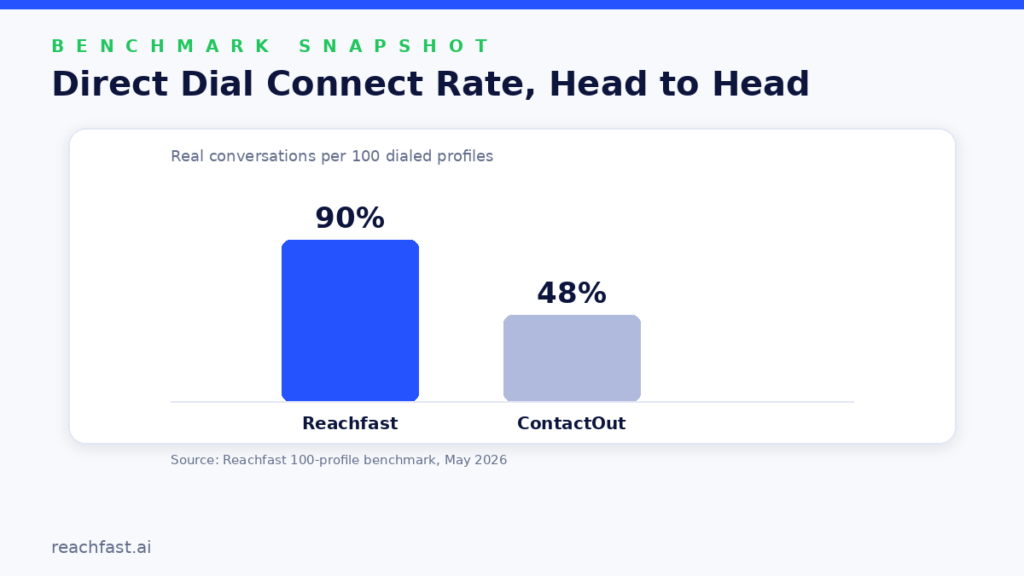
The trade-off shows up in accuracy at scale. In Reachfast’s own head-to-head benchmark against ContactOut, run on a 100-profile sample in May 2026, ContactOut returned more raw phone numbers but a lower share of them actually connected, while Reachfast returned fewer numbers with a meaningfully higher connect rate. That’s worth checking on your own list, since results shift by industry and region.
Pricing: Free; Email Plan $49/user/month; Email + Phone $99/user/month.
Best for: Teams that want contact data layered directly on the LinkedIn interface and don’t mind a credit-based cost per seat.
3. Kaspr
Kaspr is another extension-first tool, built specifically for sales teams doing outbound prospecting from LinkedIn and Sales Navigator. It leans hard into phone-based prospecting, which shows in how it’s marketed and who uses it.
It’s a solid fit if your whole team is already living inside LinkedIn for research and just needs a one-click way to pull a number without switching tabs.
Pricing: Free; Starter $59/user/month; Business $99/user/month.
Best for: Outbound SDR teams that want lightweight LinkedIn-native prospecting without a heavier CRM layer.
4. SignalHire
SignalHire markets itself around a large profile database (800 million-plus indexed profiles across dozens of sources), with contacts verified in real time when you request them rather than served from a static cache. That real-time model cuts both ways: numbers tend to be fresher, but you’ll also get occasional misses on people the system can’t verify at the moment you ask.
It’s particularly popular with recruiters, partly because it tends to surface personal numbers and emails as well as work ones, which matters when you’re trying to reach a passive candidate outside their current employer’s inbox.
Pricing: Free (5–10 credits/month); paid plans from $69/month for email-only or phone-only credits, with combined email + phone plans running higher. See our Reachfast vs. SignalHire comparison for a side-by-side on accuracy and connect rate.
Best for: Recruiters and staffing teams who need personal contact details, not just corporate ones.
5. SalesQL
SalesQL is the most budget-friendly extension-based option on this list, with a free plan that includes 50 credits a month and paid tiers starting well below most competitors. It works directly from LinkedIn, Sales Navigator, and Recruiter searches, and also supports bulk CSV enrichment for teams that want to clean up an existing list rather than look up one profile at a time.
Pricing: Free (50 credits/month); Basic $39/month (2,000 credits); Professional $79/month (5,000 credits, 3 seats); Organization tier for larger teams. Full details on Reachfast vs. SalesQL.
Best for: Smaller teams or solo recruiters who want LinkedIn enrichment without a big monthly commitment.
6. Lusha
Lusha has grown from a simple contact finder into a broader sales intelligence platform, adding buyer intent signals and company-level data alongside its core phone and email lookups. The Chrome extension still works the way people expect: open a LinkedIn profile, reveal the contact info. The platform behind it now does more.
Pricing: Free; Starter $49.90/month; Pro $69.90/month; Premium $399.90/month; Scale (custom).
Best for: Teams that want contact data bundled with intent signals like job changes and hiring activity.
7. Surfe
Surfe takes a slightly different angle: instead of positioning itself primarily as a phone finder, it’s built to capture LinkedIn profiles and sync them straight into your CRM. Contact enrichment, including phone numbers when available, happens as part of that sync rather than as the headline feature.
Pricing: Free; Essential $39/user/month; Pro $79/user/month.
Best for: Teams whose main pain point is manually re-entering LinkedIn leads into a CRM, not just finding numbers.
8. Apollo
Apollo isn’t a LinkedIn-only tool. It’s a full outbound platform with its own contact database, sequencing, and a built-in dialer, but its browser extension does let you capture LinkedIn profiles and match them against Apollo’s data. For teams that want prospecting, enrichment, and outreach in one subscription, that’s the appeal.
The trade-off is that Apollo relies more on database matching than on a purpose-built LinkedIn extraction workflow, so results can be less consistent on profiles outside its core coverage.
Pricing: Free; Basic $49/month; Professional $79/month; Organization $119/month.
Best for: Teams that want a single platform for contact data and outbound execution, not just phone lookups. For a deeper look at how it stacks up specifically on contact accuracy, see how Reachfast compares on data verification.
9. RocketReach
RocketReach is a general-purpose people and company search tool that many reps use alongside LinkedIn rather than as a native extension for it. You can search by name and company, and it will return emails and phone numbers when it has them, but the workflow feels more like a separate lookup step than an in-LinkedIn overlay.
Pricing: Free; Essentials $49/user/month; Pro $99/user/month; Ultimate $209/user/month.
Best for: Teams that want broader coverage beyond LinkedIn, including people who aren’t active on the platform.
How to Choose the Right Tool for Your Team
A few questions are worth answering before you commit to a monthly plan:
- Do you need direct/mobile numbers, or is a work-direct line good enough? Some tools lean heavily toward mobile, others still return a fair number of switchboard lines.
- How is pricing structured — per seat, or shared credits? Per-seat pricing gets expensive fast for larger teams; shared credit pools scale differently.
- Does the provider guarantee accuracy in any way? A credit refund on bad data is a meaningful signal that a vendor stands behind its numbers.
- How fresh is the data? People change jobs and numbers constantly. Ask how often the provider refreshes its records.
- Does it fit your actual workflow? An extension that works directly on LinkedIn profiles saves more time than a tool that requires exporting lists elsewhere first.
If you’re specifically weighing the broader “personal contact finder” category — including tools built for consumer people-search rather than B2B prospecting — our roundup of personal phone and email finder tools covers that ground in more detail.
LinkedIn’s Rules on Contact-Finding Tools
It’s worth being clear about what these tools do and don’t let you do. LinkedIn’s User Agreement prohibits using scripts, bots, crawlers, or other automated methods to scrape profiles or copy data from its platform, and separately bars using automated methods to access the service, add contacts, or send messages without authorization. That restriction is why the reputable tools in this list work by matching a LinkedIn profile against their own independently sourced contact databases, rather than by scraping your logged-in LinkedIn session.
The legal picture around scraping publicly visible web data is genuinely more nuanced than a lot of marketing copy suggests. The hiQ Labs v. LinkedIn case worked its way through US courts on the question of whether scraping public profile data violates federal computer-fraud law, and the outcome didn’t give scrapers a blank check — it just narrowed one specific legal theory LinkedIn had used against them. LinkedIn’s own Terms of Service prohibition on scraping remains in force regardless of how that case landed, and unauthorized automation on your own account can still get it restricted.
The practical takeaway: use LinkedIn to identify the right person the normal way — searching, browsing, using Sales Navigator — and use a contact-enrichment tool as a separate step that queries its own data sources. Don’t install anything that promises to auto-scrape your LinkedIn feed or automate actions on your account. And once you do have a number, remember that finding it and having permission to market to it aren’t the same thing; rules like GDPR, PECR, and TCPA vary by where your prospect is located, so it’s worth checking what applies to your outreach before you dial. We’ve put together a fuller pre-outreach compliance checklist if you want to work through this in more detail.
Frequently Asked Questions
Can you find phone numbers on LinkedIn directly from someone’s profile?
Sometimes directly — a small share of members list a number in their Contact Info — but most of the time you’ll need a contact-enrichment tool that matches the LinkedIn profile against its own data sources. Coverage varies by person, industry, and region, so no tool finds a number for every profile.
Which tool has the best phone number coverage on LinkedIn?
It depends on your target market. Tools that pull from multiple data providers, like Reachfast’s 7+ source waterfall, tend to have an edge on hard-to-find profiles, but it’s worth testing two or three tools on a sample of your own prospects rather than relying on any single vendor’s marketing numbers.
Is it legal to use a phone number finder on LinkedIn?
Using a compliant enrichment tool to find a number is generally fine, but using that number for outreach is governed separately by privacy and telemarketing laws like GDPR, PECR, and TCPA depending on where the person is located. Check the rules that apply to your market before running campaigns at scale.
Do these tools scrape LinkedIn directly?
Reputable tools don’t scrape your logged-in LinkedIn session. They match the LinkedIn profile or URL you give them against independently sourced contact databases. LinkedIn’s User Agreement prohibits unauthorized scraping and automation, so avoid any tool that claims to bypass that.
What’s the difference between a “direct” number and a regular phone number?
A direct number reaches the specific person — usually a mobile or a work-direct line with an extension. A generic number often routes to a company switchboard or receptionist, which adds a step (or a dead end) before you reach the actual decision-maker.
Are free plans on these tools actually usable?
Most free tiers are enough to test accuracy and workflow fit on a handful of contacts, which is worth doing before you commit to a paid plan. They’re generally too limited for running a full outbound campaign.
Which Tool Should You Pick?
There’s no single winner here, because “best” depends on whether you’re optimizing for raw coverage, price, or how well a tool fits your existing workflow. If your team is doing high-volume outbound from LinkedIn and cares most about a number actually getting answered rather than just existing, it’s worth starting with a free trial of Reachfast and testing it against whatever you’re currently using on the same list of prospects. If you want the full step-by-step walkthrough of that workflow, we cover it in detail in how to find verified phone numbers from LinkedIn.
Whichever tool you land on, the fundamentals don’t change: verify before you dial, keep your CRM clean, and treat a phone number as the start of a conversation, not a shortcut around actually researching who you’re calling.