You have a phone number sitting in a spreadsheet, a CRM record, or a text message thread — and no email address to go with it. Maybe a lead gave you their mobile number at a trade show. Maybe a candidate texted you but never replied to your LinkedIn message. Whatever the reason, you now need to find an email address from a phone number, and a plain Google search isn’t cutting it.
The good news: this is a solved problem in 2026, just not in the way most people expect. There is no single global directory that maps every phone number to an email address — that data doesn’t live in one place, and no legitimate provider can promise 100% coverage. What actually works is a layered approach: start with free, low-effort checks, then move to purpose-built lookup tools when those checks come up empty.
This guide walks through every realistic method, in the order you should actually try them, along with the legal boundaries you need to know before you start dialing or emailing anyone.
Key Takeaways
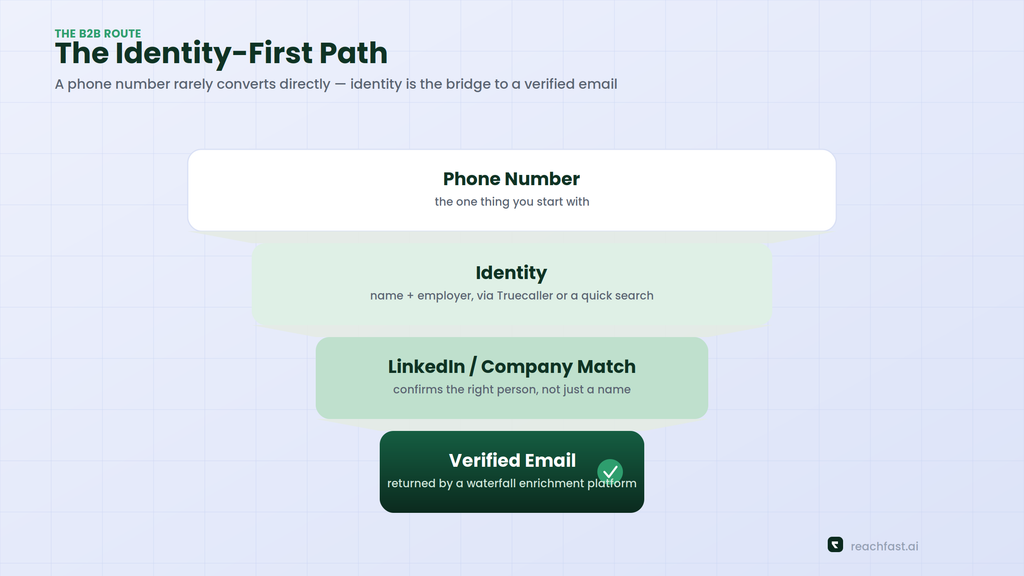
- A phone number rarely converts directly into an email address. The realistic path is phone number → identity (name, employer, LinkedIn profile) → verified email.
- Free methods (Google, social platforms, messaging apps) work often enough to try first, but they’re slow and inconsistent.
- Reverse phone lookup apps like Truecaller are built to return a name, not a work email — treat them as step one, not the finish line.
- For business contacts, waterfall enrichment platforms that check multiple data providers at once return meaningfully higher match rates than any single free tool.
- GDPR, CCPA, and TCPA all apply to how you use an email or phone number once you find it, even if finding it was perfectly legal.
What “Finding an Email From a Phone Number” Actually Means
Phone numbers and email addresses aren’t stored together in one master database the way a name and address might be in a phone book. They come from different systems — carriers, app sign-ups, business directories, professional networks — and providers stitch them together by cross-referencing public records, licensed data partnerships, and information people have shared on platforms like LinkedIn or Facebook.
That’s why the fastest, most reliable route almost always runs through identity first. Once you know who owns a number — their name and, for business contacts, their employer — finding a matching email becomes a much easier, more accurate lookup than trying to reverse-engineer it from digits alone.
Free Ways to Try First
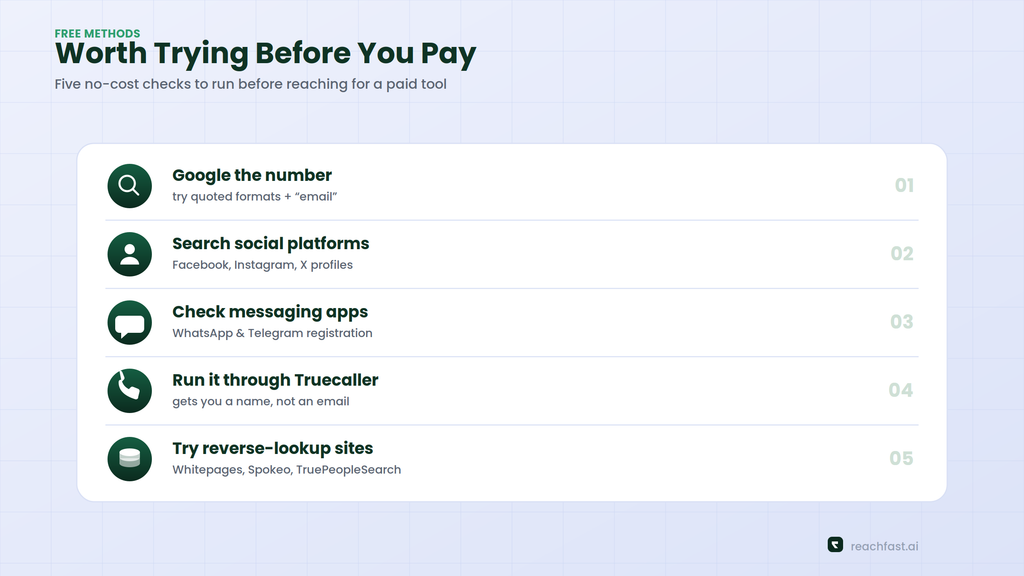
Before paying for anything, run through these. They cost nothing but time, and for a handful of contacts they’re often enough.
1. Search the number on Google
Type the number in quotation marks, exactly as it might appear online, and try a few formats: "555-123-4567", "(555) 123-4567", and "5551234567". Add a second term like the person’s employer, “email,” or “@gmail.com” to narrow things down. This surfaces the number on business directories, old forum posts, event registration pages, or a company “meet the team” page — any of which might list an email address alongside it.
2. Search social platforms directly
Facebook, Instagram, and even X allow number-based search in some regions, and many people still link a phone number to a public profile. If the profile is a business page, the “About” section frequently lists a work email right next to the phone number.
3. Check messaging apps
WhatsApp and Telegram both let you check whether a number is registered, and the linked profile sometimes includes a name, photo, or business description that gets you to identity faster than a blind search.
4. Try Truecaller or a similar caller-ID app
Truecaller crowdsources contact data from hundreds of millions of users who’ve shared their address books, so it’s genuinely useful for putting a name to an unknown number — it claims to cover well over a billion numbers worldwide. What it usually won’t hand you directly is a work email; it’s built for caller ID and spam screening, not contact enrichment. Use it to get the name, then move to the next step.
5. Consumer reverse-lookup sites
Tools like Whitepages, Spokeo, and TruePeopleSearch pull from public records, and BeenVerified layers in background-report data. Some of these return an associated email in a paid report; most only confirm a name and address history for free. They’re built for personal, US-centric lookups and tend to struggle with business contacts or international numbers.
The B2B Route: Contact Enrichment Platforms
Free methods top out fast once you’re working through more than a handful of contacts, or once your target is a business professional rather than a private individual. This is where dedicated enrichment tools earn their keep, and it’s the method sales, recruiting, and partnerships teams rely on almost exclusively.
The mechanism is usually called waterfall enrichment: instead of querying one database, the platform checks several data providers in sequence and returns the first verified match, which is why multi-source tools consistently out-cover single-source ones. Reachfast, for example, runs contact requests across 7+ data providers and verifies both phone numbers and emails at the moment of export rather than serving up stale, unchecked records.
If you’re starting from a LinkedIn profile instead of a bare phone number, the workflow is even more direct — our guide on finding verified phone numbers from a LinkedIn URL covers that companion process in detail, and it’s worth reading if LinkedIn is usually your starting point.
Step-by-step: turning a phone number into a verified email
- Get a name first. Run the number through Truecaller, a quick Google search, or a social platform check. You’re looking for a name and, ideally, an employer.
- Find their LinkedIn or company profile. A name plus a company is usually enough to locate the right LinkedIn URL in a few seconds.
- Feed that into an enrichment platform. Paste the LinkedIn URL or enter the name and company into a tool such as Reachfast, and let it cross-reference its data providers for a verified email.
- Verify before you send. Good platforms re-check deliverability at export time. If yours doesn’t, run the address through a separate email verifier before adding it to any outreach sequence.
- Log the source. Note where the contact data came from — you’ll want this for compliance records, covered below.
This same identity-first logic is behind our companion piece on seven reverse contact discovery methods, which goes deeper into ranking these approaches by hit rate.
Comparing Your Options
| Method | Cost | Typical Accuracy | Best For |
|---|---|---|---|
| Google / social search | Free | Low, inconsistent | A one-off personal lookup |
| Truecaller / caller ID apps | Free–$5/mo | Good for name, weak for email | Identifying who’s calling |
| Consumer reverse lookup (Whitepages, Spokeo) | $15–30/mo | Moderate, US-focused | Personal, non-business contacts |
| B2B enrichment platforms (Reachfast, Apollo, Lusha) | Pay-per-contact or subscription | High, verified at export | Sales, recruiting, business contacts |
Is It Legal to Find Someone’s Email From Their Phone Number?
Finding contact information isn’t the same as having a blank check to use it however you like, and the rules differ depending on where the person lives and what you plan to do next.
GDPR (EU/UK): Processing a business contact’s data is generally allowed under the “legitimate interest” basis in Article 6(1)(f), provided your outreach is relevant to their professional role, you’re transparent about where the data came from, and you offer a clear way to opt out. This is not blanket permission — it comes with a documentation expectation, and regulators have levied fines in the billions of euros cumulatively since GDPR took effect.
CCPA/CPRA (California) and 20+ other US state laws: California is currently the only US state that explicitly extends privacy rights to business contacts, not just consumers, so B2B data on California-based professionals falls under CCPA. Roughly twenty US states now have comprehensive privacy laws in effect as of 2026, and the list keeps growing.
TCPA (US): This one governs how you contact someone by phone or text, not how you found them. Autodialed or prerecorded calls and marketing texts to mobile numbers generally require prior consent, and penalties run from $500 to $1,500 per willful violation. Manual, one-to-one dialing has more legal breathing room than automated campaigns.
LinkedIn’s own rules: If your search touched LinkedIn at any point, remember its User Agreement prohibits unauthorized scraping or automated data collection from the platform. Use tools that source data through licensed methods, not scrapers.
For a full walkthrough of building outreach that respects all of this, see our guide to designing a GDPR-compliant prospecting workflow. If you want the broader compliance landscape, Unify’s B2B data compliance guide and Databar’s overview of privacy-first enrichment are both solid, current references.
Tips for Better Match Rates
- Start with the most specific search terms you have. A name plus a company beats a name alone every time.
- Try multiple number formats. International, national, and stripped-punctuation versions of the same number index differently across sites.
- Cross-check two sources before you commit. A single hit can be outdated; two independent sources agreeing is a much stronger signal.
- Re-verify before sending anything. Contact data decays constantly — people change jobs, carriers, and email providers. Our outbound data hygiene checklist covers how often to refresh records you’re actively using.
- Don’t rely on one tool. Coverage varies a lot by country and industry, which is exactly why waterfall tools that pull from AI-verified, multi-provider sources outperform any single database.
Common Mistakes to Avoid
- Guessing email formats and blasting them out. Sending to
firstname.lastname@company.comwithout verification tanks your sender reputation when it bounces. - Skipping the opt-out mechanism. Even under legitimate interest, you need an easy way for people to say no to further contact.
- Treating a caller-ID hit as confirmed identity. Crowdsourced apps are frequently right, but not infallible — verify before you act on the name they return.
- Ignoring international number formats. A US-formatted search on an international number will miss almost everything; always try the E.164 format (
+and country code) as well.
Frequently Asked Questions
Can you always find an email address from just a phone number? No. Coverage depends on how much of that person’s data is public or held by licensed providers. Business professionals are generally easier to match than private individuals, since work emails tend to be more discoverable than personal ones.
Is Truecaller enough on its own? Usually not for email. It’s excellent for identifying a caller’s name and screening spam, but it isn’t built as an email-finding tool. Treat it as the first step in a two-step process.
What’s the fastest method for a business contact? Feeding a name and company — or a LinkedIn URL, if you have one — into a waterfall enrichment platform is faster and more accurate than manual searching once you’re past one or two lookups.
Do I need consent to email someone I found this way? Under GDPR, legitimate interest can cover relevant B2B outreach without prior consent, as long as you’re transparent and provide an opt-out. Other jurisdictions vary, so check the rules that apply to where the person is based.
How fresh does the data need to be? Phone numbers and job titles change often enough that data older than a few months should be re-verified before you rely on it for anything beyond a single lookup.
Final Thoughts
There’s no shortcut that turns a phone number straight into a guaranteed email address — but there is a reliable process. Start free, confirm identity first, and lean on a multi-source enrichment platform once you’re dealing with more than a couple of contacts or need business-grade accuracy. Reachfast is built around exactly this workflow: paste in what you have, and it checks 7+ data providers for a verified match, with both phone numbers and emails re-checked at export so you’re not sending to a dead address.
If you’re doing this at any real volume, it’s worth reading how modern teams turn a phone call into a full contact record — the next article in this series looks specifically at how sales teams build this into a repeatable workflow rather than a one-off search.