Every SDR, recruiter, and founder has hit the same wall: you find exactly the right person on LinkedIn, and the profile just… stops there. No phone number, no way to call, nothing but a “Connect” button and a hope that they check their messages.
Getting a phone number from LinkedIn isn’t actually one thing — it’s four different methods, each suited to a different situation. This guide walks through all four, shows you the workflow that scales beyond one contact at a time, and covers what LinkedIn’s own rules and privacy law actually allow before you start dialing.
Key takeaways
- LinkedIn was never designed to expose phone numbers by default; the platform’s own guidance notes that visibility depends entirely on what each member chooses to share.
- You have four real options: check the profile manually, ask directly after connecting, export a list from Sales Navigator for bulk enrichment, or use a phone-number-finder tool for one-off lookups.
- A missing or wrong phone number isn’t just an inconvenience — it’s measurable time your team loses every single day.
- Getting the number and having permission to call are two separate questions; GDPR, CCPA, and telemarketing rules apply once you start outreach.
Why the Number Usually Isn’t Just Sitting on the Profile
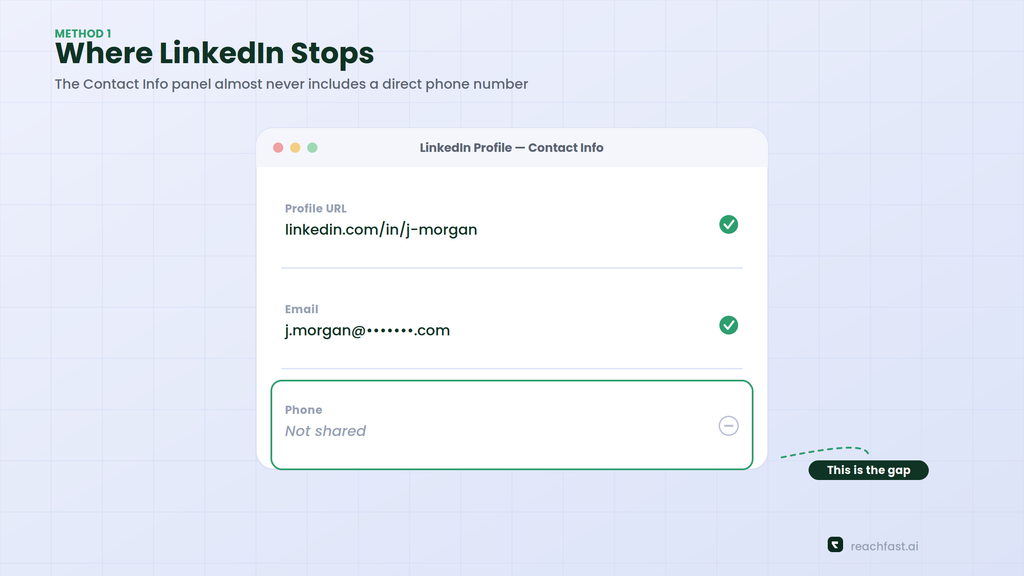
LinkedIn’s Contact Info section can hold a phone number, but only when a member has chosen to add one and made it visible — often restricted to first-degree connections rather than the public. In practice, that means the overwhelming majority of profiles you research simply won’t have a usable number on the page itself, regardless of how senior or reachable that person actually is.
This isn’t a bug to work around with browser tricks. It’s a deliberate privacy default, and it’s exactly why an entire category of enrichment tools exists — to bridge the gap between “I found the right person on LinkedIn” and “I have a way to actually call them.”
Method 1: Check the Contact Info Section
Start here, because it costs nothing. Open the profile, click Contact Info near the top, and see what’s listed. Some members — particularly founders, consultants, and people who actively want inbound calls — do list a direct number.
This works often enough to be worth the ten seconds it takes, but it’s not a repeatable strategy. If you’re researching more than a handful of people a week, you’ll spend more time checking empty Contact Info panels than you’ll spend actually calling anyone.
Method 2: Ask for It Directly
Sometimes the simplest method beats every tool on the market: connect, send a short, specific message, and ask for a quick call.
This works because context changes everything. A cold ask for a phone number feels intrusive. The same ask after a real exchange — “would a 10-minute call be easier than going back and forth here?” — often lands fine. It’s slower and doesn’t scale to hundreds of contacts, but for high-value accounts it can produce better first conversations than a database ever will.
Method 3: Export From Sales Navigator, Then Enrich in Bulk
Once you’re past one-off lookups and into building an actual list — 50, 200, 1,000 prospects — the workflow changes. You’re no longer looking up numbers one profile at a time; you’re exporting a filtered list of profile URLs from LinkedIn or Sales Navigator, then running that whole list through an enrichment tool at once.
This is where the real time savings show up. Our guide on the best AI tools for LinkedIn lead generation covers how modern prospecting workflows chain list-building and enrichment together instead of treating them as separate steps, and our walkthrough of the Reachfast Chrome extension shows how the same enrichment can happen directly inside your browser as you build the list, without ever leaving LinkedIn.
Method 4: Use a Phone Number Finder Tool
For everything in between — a single high-priority prospect you need reached today, or a rolling stream of new leads — a dedicated finder tool is the most practical option. You paste in a LinkedIn URL, and the tool checks it against contact databases the same way it would for a bulk list, just for one person at a time.
The best of these run what’s called waterfall enrichment: querying several data providers in sequence rather than relying on one source, because no single database has complete coverage on its own. We cover exactly how that process works in more depth in our piece on AI contact discovery and phone number accuracy, and how the underlying technology has evolved in how AI is transforming LinkedIn contact discovery.
Step-by-Step: Getting a Verified Number From a LinkedIn URL
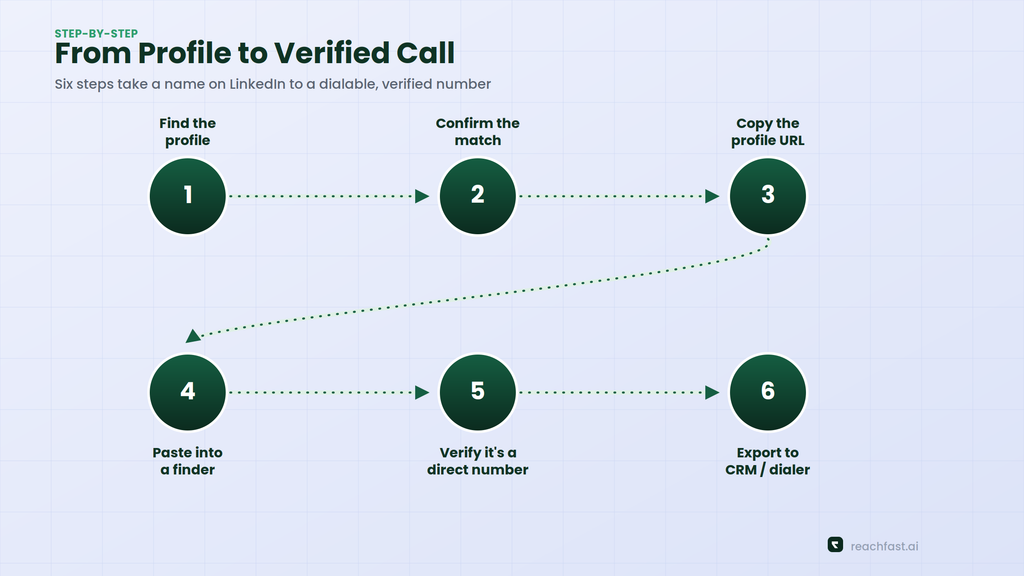
Here’s the actual workflow, start to finish:
- Find the person on LinkedIn. Filter by title, company, and location until you’ve got the right profile — not just someone with a similar-sounding job.
- Confirm it’s the right match. Double-check current company and title before spending any credits on enrichment; the wrong John Smith costs you the same as the right one.
- Copy the profile URL from the address bar.
- Paste it into a phone number finder — Reachfast, for example, runs the URL through a waterfall across 7+ data providers and returns a verified phone number and email when one exists.
- Check whether it’s a direct number. A mobile or direct-dial line is worth far more to a cold-calling workflow than a general office switchboard.
- Export to your CRM or dialer, and start outreach with context, not a generic script.
That’s the whole process. The part that actually takes time isn’t step 4 — it’s step 1, finding the right person in the first place.
What a Missing (or Wrong) Phone Number Actually Costs You
It’s easy to treat “no phone number” as a minor annoyance. It isn’t. Manually hunting for a decision-maker’s contact details on LinkedIn typically eats two or more hours a day for reps doing it by hand, and cross-referencing job postings or old CRM records to guess at the right person adds another hour on top of that. Add in time spent juggling three or four separate tools just to land one working phone number, and calling main office lines only to get blocked by a gatekeeper, and a rep can lose the better part of a workday to research that produces nothing but a switchboard extension nobody picks up.
That adds up across a team fast, and it’s exactly the gap phone-number finders exist to close — replacing a scattered, manual process with a single lookup. Our breakdown on calculating the real cost of a bad phone number walks through the math on this in more detail if you want to model it against your own team’s pipeline.
Is It Legal to Get a Phone Number From LinkedIn?
This question has two separate answers, and conflating them is where most compliance problems start.
Getting the data: LinkedIn’s Help Center is explicit that it doesn’t permit third-party software, bots, or browser extensions that scrape, modify, or automate activity on the platform itself — that’s about unauthorized tools pulling data directly off LinkedIn’s own servers or automating your account. A phone number finder that matches a profile against separate, independently sourced databases isn’t doing that; it’s not reading LinkedIn’s pages at all.
Using the data: This is the part that actually carries legal weight, and it varies by jurisdiction. In the EU and UK, GDPR and rules like the UK’s PECR govern direct marketing by phone, with different requirements depending on whether the contact is B2B or B2C. In the US, the TCPA restricts certain kinds of automated or prerecorded calls, and the National Do Not Call Registry applies to consumer numbers. None of this means you can’t call someone whose number you found through legitimate enrichment — it means the compliance obligation shifts to how you use the number, not whether you were allowed to find it.
If you’re running outreach at real volume across multiple countries, treat this as a legal question worth answering properly rather than assuming one framework covers every market you’re calling into.
Best Practices Once You Have the Number
Finding the number is the easy part. What you do with it determines whether the whole exercise was worth it.
- Lead with a real reason to call, not a generic pitch. Reference their role, a recent company update, or something specific to why you’re reaching out.
- Combine channels instead of picking one. A call that follows a LinkedIn message or a short email tends to land better than a cold call with zero prior context — our guide on moving from email finding to phone finding covers how teams are sequencing this in practice.
- Mind time zones. A perfectly good lead can turn into a dead one if you call at 7am their time.
- Keep your CRM clean. Don’t let duplicate or stale numbers pile up just because a provider returned them — verify before you save, not after you’ve dialed a dead line three times.
- Respect opt-outs immediately. If someone asks not to be contacted, remove them from every list, not just the one they replied on.
Common Mistakes That Waste a Good Lookup
Even with the right tool, a few habits quietly undo the accuracy you’re paying for.
- Enriching the wrong profile. Common names produce mismatches more often than people expect. Confirm current company and title before you spend a credit, not after you’ve already dialed.
- Treating every result as final. A number that was correct six months ago might belong to someone else’s new job today. If a call goes nowhere, flag it rather than leaving it in your CRM for the next rep to hit the same dead end.
- Skipping the free check first. Contact Info costs nothing to glance at. It won’t work often, but it’s faster than a lookup when it does.
- Calling without any warm-up. A number with zero prior context converts worse than one preceded by even a single LinkedIn message. The number gets you access; the message gets you a conversation.
- Ignoring regional coverage gaps. If most of your list is outside North America and Western Europe, expect lower match rates and plan your outreach mix accordingly instead of assuming every profile will resolve.
Frequently Asked Questions
Can I really get a phone number from any LinkedIn profile? No. Coverage depends on whether that specific person exists in a provider’s underlying data sources. Senior roles at larger companies tend to have better coverage than junior roles or smaller, newer companies.
Is using a phone number finder the same as scraping LinkedIn? No. Scraping means pulling data directly from LinkedIn’s own pages without authorization, which violates LinkedIn’s terms. A phone number finder cross-references the profile against separate, independently sourced databases instead.
What’s the fastest way to get one phone number right now? Paste the LinkedIn URL into a finder tool like Reachfast. It’s faster than checking Contact Info manually and doesn’t require waiting on a message reply.
Do I need Sales Navigator to do this? No, but it helps at volume. Sales Navigator makes it easier to filter and export larger lists of profiles, which then feed into bulk enrichment. For single lookups, a standard LinkedIn profile URL works fine.
How accurate are the phone numbers these tools return? It varies by provider and region. Multi-source tools that verify numbers close to export time generally outperform single-database tools, but no provider can guarantee a match on every single profile.
Final Thoughts
Getting a phone number from LinkedIn isn’t about finding a hidden setting or a clever workaround — it’s about picking the right method for the situation you’re actually in. Check the profile for a one-off, ask directly once there’s context, export and enrich in bulk when you’re building a real list, and lean on a dedicated finder tool for everything in between.
If you want to see how fast that last step can actually be, Reachfast gives you 5 free verified contacts with no card required — paste a LinkedIn URL and see what comes back.