You’ve found the person. Right title, right company, right team. Their LinkedIn profile checks every box on your list — except one. There’s no phone number anywhere on it.
That’s not a glitch. LinkedIn was never built as a phone directory, and most members never add a number to their profile in the first place. If your outreach depends on getting someone on a call rather than hoping they open a cold email, you need something LinkedIn itself doesn’t provide: a LinkedIn phone number finder.
This guide breaks down what these tools actually do, what separates a good one from a database full of dead switchboard lines, and how 11 of the current options stack up on coverage, accuracy, and price.
Key takeaways
- A LinkedIn phone number finder matches a profile or profile URL against third-party contact databases — it doesn’t pull data LinkedIn itself is hiding.
- Coverage and verification vary enormously between providers. The database with the most total contacts isn’t always the one that finds your prospect.
- Direct mobile and direct-dial numbers convert far better than general office lines, so that distinction matters more than raw contact counts.
- Pricing models differ: some tools charge per credit, some per seat, and enterprise platforms like ZoomInfo and Cognism are quote-only.
- Using a phone number finder is not the same as scraping LinkedIn. The tools below pull from independent data sources, not from LinkedIn’s own servers.
What Is a LinkedIn Phone Number Finder?
A LinkedIn phone number finder is a tool that takes a LinkedIn profile — usually just the URL — and checks it against external contact databases to see if a verified phone number exists for that person. Most also return a work or personal email alongside the number, plus basic firmographic data like company size or job tenure.
They typically work in one of two ways:
- Browser extension: installs on top of LinkedIn and Sales Navigator, showing available contact data as an overlay while you browse a profile.
- URL or bulk lookup: you paste a single profile URL, or upload a CSV of many URLs, into a web app or API and get contact data back.
Neither approach reads anything LinkedIn is actively concealing. They cross-reference the person identified by the profile against data collected elsewhere — public records, opt-in data partnerships, and other legitimately sourced databases — which is why coverage differs so much from one provider to the next. As covered in our piece on how AI is transforming LinkedIn contact discovery, the shift over the last two years has been toward combining several of these sources automatically instead of checking them one at a time.
How These Tools Actually Find a Number
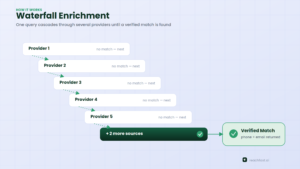
Most modern phone number finders run what’s called waterfall enrichment. Instead of relying on a single database, the tool queries several data providers in sequence — if the first source doesn’t have a match, it automatically tries the next, and the next, until it finds a verified result or exhausts its sources.
This matters because no single provider has full coverage. One source might be strong for US enterprise contacts, another for European mobile numbers, and a third for candidates in staffing and recruiting. Stacking them is the only realistic way to push match rates above what any individual database can offer on its own — our breakdown of how machine learning improves phone number accuracy goes into more detail on why this matters more than total database size.
The other piece is verification. A tool that just spits out whatever number a database has on file, without checking it, will hand you a lot of dead lines. Better platforms re-verify a number close to the moment you export it, or flag when a number is confirmed mobile versus a shared office extension.
What to Look for Before You Pick One
Not every “LinkedIn phone number finder” is built the same way, and the differences show up fast once you’re actually dialing.
- Direct dials, not switchboards. A general office number that routes through a receptionist isn’t much better than no number at all for outbound calling.
- Verification cadence. Ask how often phone data gets refreshed. People change jobs and numbers constantly, so a database that hasn’t been touched in a year will feel outdated quickly.
- Multi-source coverage. Tools using a waterfall across several providers consistently outperform single-source databases, especially outside the US.
- Export and workflow fit. Can the tool push directly into your CRM or dialer, or are you stuck copy-pasting from a spreadsheet?
- Compliance posture. Look for a provider that’s explicit about GDPR/CCPA sourcing rather than vague about where the data comes from — see our guide on verifying B2B leads before you call or email for a fuller checklist.
- Pricing that matches your volume. Per-credit pricing is cheaper at low volume; flat enterprise contracts make more sense once you’re enriching thousands of contacts a month.
11 Best LinkedIn Phone Number Finder Tools in 2026
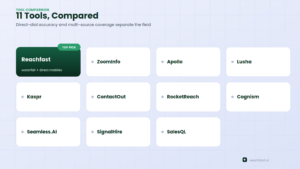
| Tool | Best for | Starting price |
|---|---|---|
| Reachfast | Waterfall accuracy + direct mobile numbers | $99.99/mo (or 5 free contacts) |
| ZoomInfo | Enterprise US direct-dial depth | Custom (enterprise-only) |
| Apollo | Contact data bundled with outbound sequencing | Free tier; $49/mo+ |
| Lusha | Fast Chrome-extension reveals | Free tier; $49.90/mo+ |
| Kaspr | LinkedIn/Sales Navigator-native workflow | Free tier; $59/mo+ |
| ContactOut | Recruiter-focused email + phone overlay | Free tier; $49/mo+ |
| RocketReach | Broad people + company database | Free tier; $49/mo+ |
| Cognism | Phone-verified mobiles, strong in EMEA | Custom only |
| Seamless.AI | Contact discovery at scale | Free tier; custom paid |
| SignalHire | Simple per-credit phone/email reveals | Free tier; paid credits |
| SalesQL | Lightweight LinkedIn extension | Free tier; paid credits |
1. Reachfast
Reachfast is built specifically around one input: a LinkedIn URL. Paste it in, and the platform runs a waterfall across 7+ data providers to surface a verified phone number and email, prioritizing direct mobile numbers over generic office lines. It backs results with a 100% accuracy guarantee — flag a bad number and get your credits refunded. Coverage sits around 50–60% for mobile numbers and 90%+ for work emails, and the free plan includes 5 verified contacts with no card required. See how it stacks up directly against ZoomInfo, Apollo, and Lusha here, or against Apollo specifically.
2. ZoomInfo
ZoomInfo has long been the enterprise benchmark for US direct-dial depth, paired with intent data and org charts. It’s less a phone finder than a full sales-intelligence platform, and pricing reflects that — contracts commonly start in the five-figure range annually, which puts it out of reach for smaller teams that just need a LinkedIn-to-phone workflow.
3. Apollo
Apollo combines a large B2B database with built-in sequencing, so contact discovery and outreach live in the same tool. Its browser extension captures LinkedIn profiles and matches them against Apollo’s database. The trade-off is that accuracy on phone data — especially mobiles — can be inconsistent outside core US and UK markets, and heavy use burns through credits quickly.
4. Lusha
Lusha’s Chrome extension is built for speed: open a profile, click reveal, get a number. It has a genuinely useful free tier and decent US/European coverage, but the database is shallower than the larger platforms, so hit rates drop noticeably on less common job titles or smaller companies.
5. Kaspr
Kaspr is designed to live inside LinkedIn and Sales Navigator, extracting contact details as you browse or run searches. It’s popular with outbound teams that prospect heavily inside LinkedIn itself, though contact data is credit-based and the tool leans more toward prospecting than CRM-style organization.
6. ContactOut
ContactOut overlays emails and phone numbers directly on LinkedIn profiles, and it’s especially popular with recruiters sourcing candidates rather than sales teams chasing buyers. Coverage is solid for professional emails; phone data availability varies more by region and seniority.
7. RocketReach
RocketReach isn’t LinkedIn-native, but its browser workflow is commonly used alongside LinkedIn research to pull phone and email data from a broader people-and-company database. It’s a reasonable fit for teams that want contact discovery beyond just LinkedIn profiles.
8. Cognism
Cognism is a premium, compliance-forward platform with a strong reputation for phone-verified mobile numbers, particularly across EMEA. It’s built for larger outbound teams rather than solo prospectors, and there’s no published pricing — every deal is a custom quote.
9. Seamless.AI
Seamless.AI focuses on contact discovery at scale, with a usable free entry point before pricing shifts to custom plans. It works well as a broader sales-intelligence layer once you’ve identified a prospect on LinkedIn, though the database-first workflow feels less structured than dedicated CRM-style tools.
10. SignalHire
SignalHire is a lightweight, credit-based option: install the extension, reveal a number or email on a profile, spend a credit. It’s a reasonable low-commitment starting point, though coverage and refresh rates are less transparent than the larger platforms. See our direct comparison here.
11. SalesQL
SalesQL takes a similar credit-based, extension-first approach aimed at SDRs who need quick reveals without a heavier platform. It covers the basics well but doesn’t offer the multi-source waterfall depth that pushes match rates higher on harder-to-find contacts. Compare it against Reachfast on this page.
Is It Legal to Use a LinkedIn Phone Number Finder?
Finding contact data and having unlimited permission to call someone are two different things — and this is where teams get into trouble.
LinkedIn’s own User Agreement and Help Center guidance is clear that it doesn’t permit third-party software, bots, or browser extensions that scrape, modify, or automate activity on the platform itself. That’s specifically about pulling data from LinkedIn’s servers without authorization or automating actions on your account.
That’s a different thing from what the tools above actually do. A phone number finder isn’t reading data off LinkedIn’s pages — it’s matching a profile you’re already viewing against separate, independently sourced databases. That distinction is why reputable providers can operate legally while still respecting LinkedIn’s terms.
Where the real compliance risk lives is on the outreach side. Once you have a number, GDPR, CCPA, and telemarketing rules like the US TCPA or the UK’s PECR govern how and when you can contact someone, especially by phone or text. Coverage, consent requirements, and permitted contact windows vary by country, so if you’re calling internationally at volume, it’s worth a real compliance review rather than assuming one rule set covers every market. Our guide on improving data accuracy with AI verification also covers why sourcing quality affects your compliance exposure, not just your hit rate.
How to Find a Phone Number on LinkedIn: Manual vs. Tool-Based
There are really only three routes:
- Check the profile’s Contact Info section. Occasionally a member adds their own number, but it’s visible only if they’ve chosen to share it, and often only with first-degree connections. This works rarely enough that it isn’t a real strategy at any volume.
- Message them and ask. After a genuine first interaction, a short, specific message asking for a quick call sometimes works better than any database — people respond differently once there’s already context.
- Use a phone number finder. For anything beyond a handful of contacts a week, this is the only approach that scales.
Most teams end up using all three: manual checks for VIP accounts, a direct ask once a conversation has started, and a tool for everything in between.
Step-by-Step: Finding a Number With Reachfast
- Identify the prospect on LinkedIn using filters for title, company, and location.
- Copy their profile URL from the address bar or the “Share” button.
- Paste the URL into Reachfast, either through the web app or the Chrome extension.
- Review the result. Reachfast runs its provider waterfall and returns a verified mobile number and email when available, prioritizing direct numbers over switchboard lines.
- Export to your CRM or dialer, or start outreach directly from the platform.
- Report anything inaccurate. Under the 100% accuracy guarantee, a confirmed bad number gets your credits refunded.
Frequently Asked Questions
Does a LinkedIn phone number finder work for every profile? No. Results depend entirely on whether that person exists in the provider’s underlying databases. Junior roles, smaller companies, and certain regions consistently have lower coverage than senior roles at larger organizations.
Is a free LinkedIn phone number finder worth using? For light, occasional use, yes — most tools on this list offer a free tier or free credits. For consistent prospecting volume, a paid plan with better verification and coverage usually pays for itself in saved research time.
What’s the difference between a phone number finder and a scraper? A phone number finder matches your prospect against independent third-party databases. A scraper pulls data directly off LinkedIn’s own pages without authorization, which violates LinkedIn’s terms. Reputable tools operate the first way.
Do these tools also find emails? Almost always. Most platforms, including Reachfast, return a verified email alongside any available phone number from the same lookup.
Which tool has the highest accuracy? It depends on the region and seniority of the person you’re searching for. Multi-source waterfall tools like Reachfast and Cognism generally outperform single-database tools, but no provider guarantees a match on every profile.
Final Thoughts
There’s no single “best” LinkedIn phone number finder for every team — a recruiter sourcing five senior candidates has different needs than an SDR team enriching hundreds of accounts a week. What matters is matching the tool to your volume, your target regions, and how much you actually need a direct mobile number versus just an email.
If direct-dial accuracy and multi-source coverage are the priority, Reachfast is worth testing first — start with 5 free verified contacts and see the match rate on your own list before committing to a plan.